Want to Download JeetKing Game on iOS?
Due to platform restrictions, JeetKing Game currently does not offer a native iOS app on the Apple App Store.
You can still install and use JeetKing Game on your iPhone or iPad in under 30 seconds by creating a Home Screen shortcut using the official web version.
✓ No third-party tools
✓ No technical skills needed
This method allows JeetKing Game to appear on your home screen like a real app. Just tap and play.
In this guide, I'll walk you through JeetKing Game download iOS setup step by step.
JeetKing Game Download iOS: Step-by-Step Installation Guide
This method works on all iPhones and iPads running iOS 10 or later.
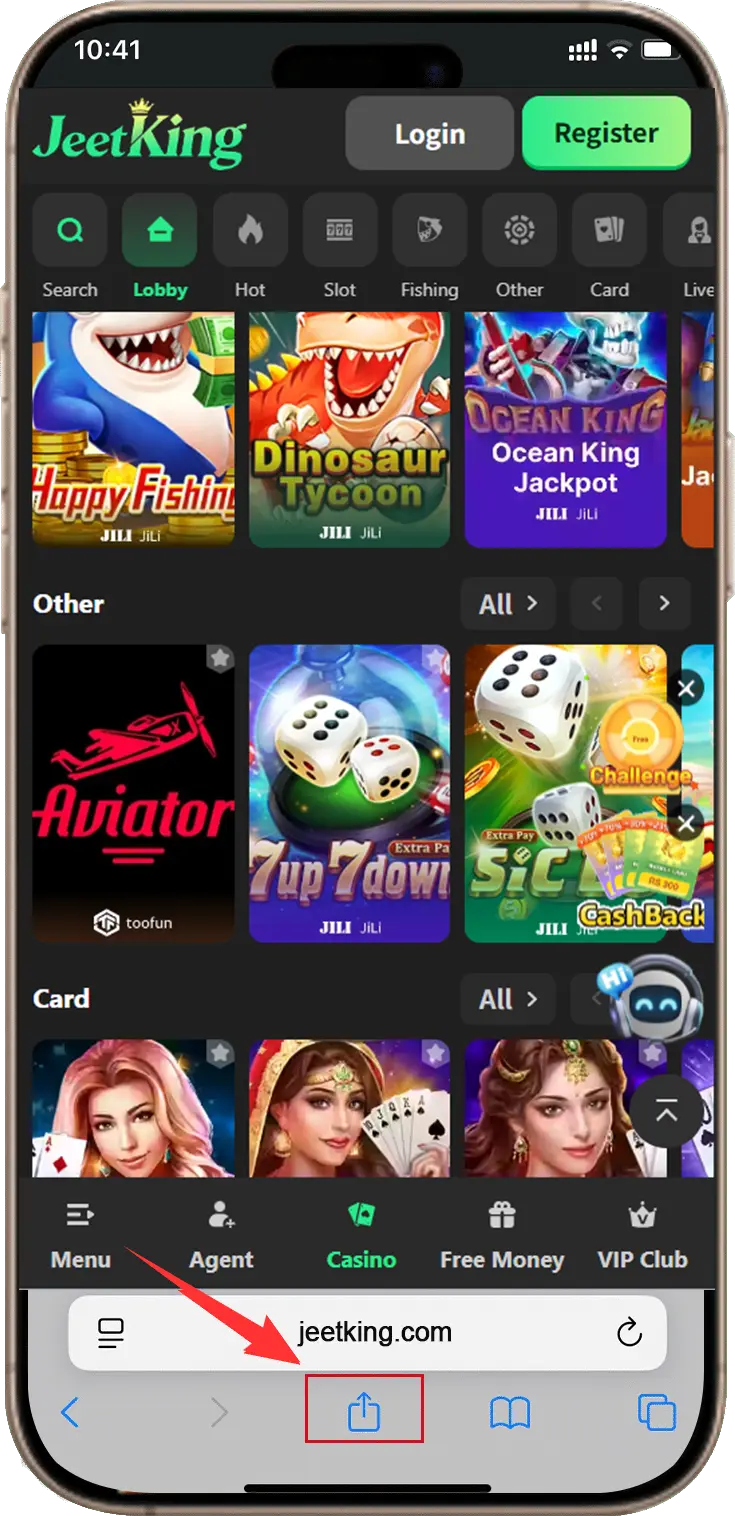
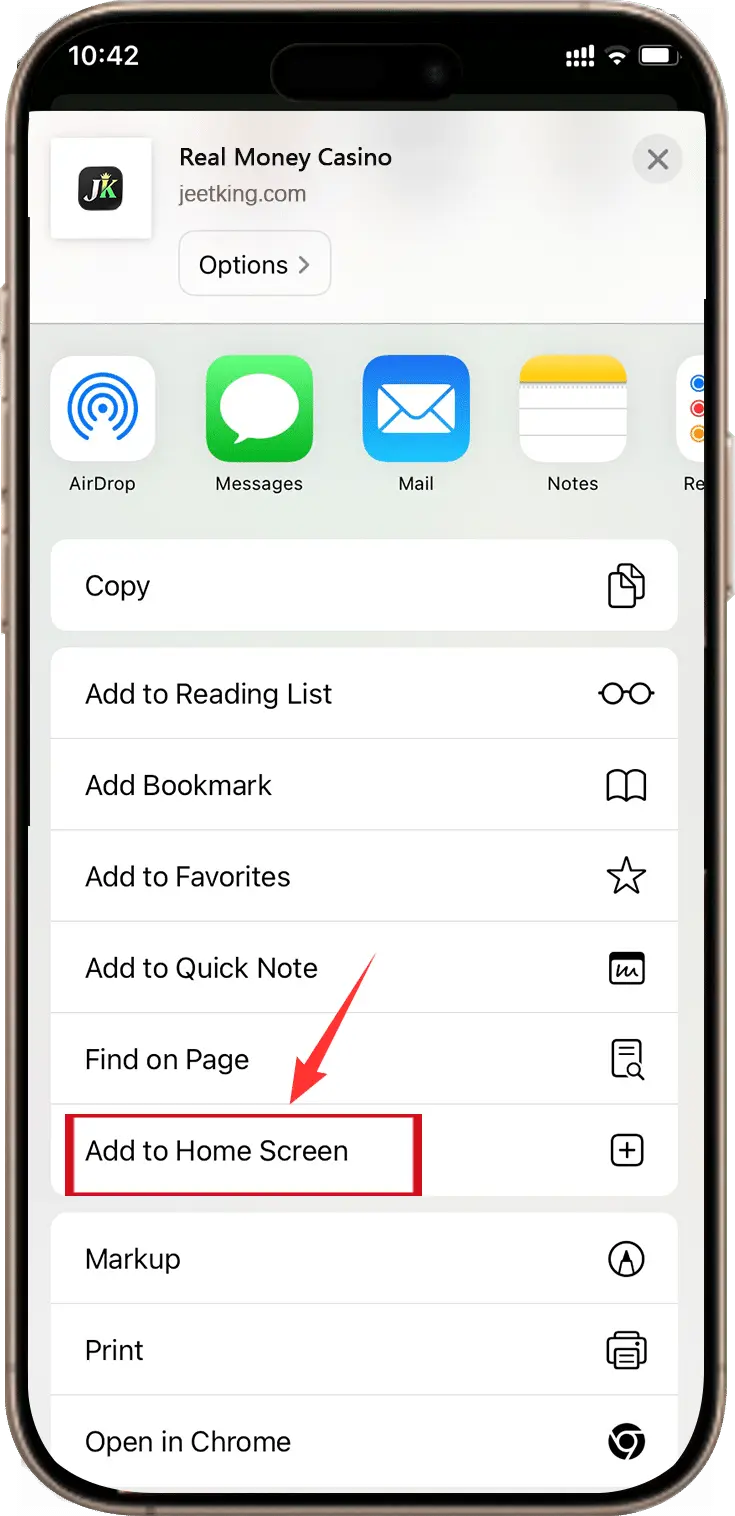
1Open Safari Browser
Open Safari on your iPhone or iPad.
2Visit the JeetKing Game Web Version
In the Safari address bar, open the official JeetKing Game website.
3Log In or Create an Account
- Existing players: Tap Login and enter your details.
- New players: Tap Register and complete the sign-up in seconds.
This ensures your shortcut opens directly to your account.
4Add JeetKing Game to Home Screen (Key Step)
- Tap the Share icon at the bottom of Safari (box with an arrow pointing up).
- Scroll down and tap "Add to Home Screen".
- Set the name as JeetKing Game.
- Tap Add in the top-right corner.
5Open JeetKing Game Like a Real App
Go back to your home screen. You will see the JeetKing Game icon, just like a normal app.
Tap it once, and the game opens instantly.
Why JeetKing Game Has No iOS App Download
Before we start, let's clear this up in plain words.
JeetKing Game currently offers:
- Android APK download
- Official web version for iOS users
Because of Apple App Store policies, many online casino platforms choose not to release a native iOS app. Instead, they provide a secure web-based solution that works smoothly on all iPhones and iPads.
For Players, This Actually Has Benefits:
- No app approval delays
- Faster updates
- Direct access to the official platform
- Same security and features as Android
Why Use the JeetKing Game iOS Shortcut Instead of an App
Creating a JeetKing Game iOS shortcut is the recommended method for iPhone users.
Here's why it works so well:
- Very easy: Takes less than 30 seconds
- App-like feel: Opens in full screen with no browser bar
- Safe & official: Direct access to the JeetKing Game web version
- Same account: Works with Android accounts and balances
- Smooth gameplay: Perfect for Teen Patti, Aviator, slots, and live casino
For most players, this feels just like using a real JeetKing Game iPhone app.
What You Can Play on JeetKing Game iOS Version
The JeetKing Game iOS web entry gives you full access to all major games.
Popular Options Include:
- JeetKing Game Teen Patti iOS
- JeetKing Aviator iOS
- Live Casino Games
- Slots & Table Games
- Sports Betting & Crash Games
- Dragon Tiger & Blackjack
- Fishing Games & Arcade
All features, bonuses, and balances stay synced across devices.
Tips for the Best JeetKing Game iOS Experience
Want smoother gameplay? Try these tips:
- Use Wi-Fi for live casino and HD games
- Keep Safari updated for better performance
- Allow notifications if prompted for bonus alerts
- Close background apps for faster loading
- Clear Safari cache occasionally for optimal speed
These small steps make the JeetKing Game iOS install experience much smoother.
JeetKing Game iOS vs Android: Key Differences
| Feature | iOS (Safari) | Android (APK) |
|---|---|---|
| Installation | Add to Home Screen | APK Download |
| Games Available | All Games ✓ | All Games ✓ |
| Account Sync | Yes ✓ | Yes ✓ |
| Updates | Automatic | Manual APK |
Frequently Asked Questions (FAQ)- JeetKing Game Download For iOS
Troubleshooting Common iOS Issues
- Shortcut not appearing? → Make sure you're using Safari browser, not Chrome or other browsers.
- Games loading slowly? → Switch to Wi-Fi and close background apps.
- Can't log in? → Clear Safari cookies and cache, then try again.
- Bonus not showing? → Log out and log back in to refresh your account.
- Screen not full-size? → Make sure you opened the icon from home screen, not Safari directly.
Conclusion
Even without a native app, JeetKing Game download iOS is fast, safe, and beginner-friendly.
By adding the official website to your home screen, you get:
- App-like access
- Full gameplay features
- Secure and official browsing
- No complicated installation
- Same account across all devices
Tap the icon, start playing, and enjoy the full JeetKing Game iOS experience anytime, anywhere.
Good luck, play smart, and enjoy the game!
Last Updated: January 4, 2026